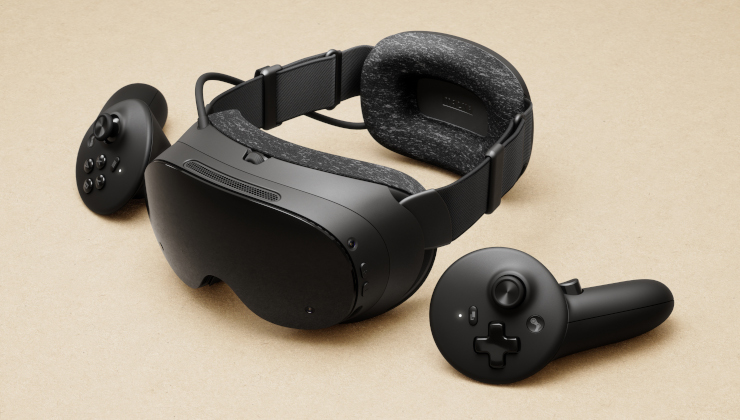
With the upcoming new Steam Frame hardware from Valve, they want to get as many games as possible running - and there's multiple ways for developers to do it.
Oh man, you’re going to get to experience it in an even better format. Index is great, 144hz looks amazing and the tracking is perfect. But the resolution is low so you get the ‘screen door effect’ and because of the lens configuration you’re getting first and second order reflections which can cause bright objects to have a glow around them and you don’t have HDR.
There are several applications that let you interact with the computer as if you had monitors. You can make the monitors are as large or small as you want them and placed where you choose. You can also just bind them to your head so they’re always in a fixed position in front of your face. I use the virtual desktop because it’s often less hassle than removing the headset and walking to my desktop. Eventually we’ll have displays with a higher DPI than you can perceive and then you could have your house wallpapered in virtual monitors if you wanted.
Another neat VR-specific thing is an overlay. Much like how Steam has an overlay where you can press a button in any game and access Steam, there are applications that perform a similar task in VR (you designate your overlay application in the Steam VR settings). I’ve been using XSOverlay, you can think of it like a holographic wristwatch/smartphone. There are good examples on YT if you’d like to see it.
In any game, when you have the overlay enabled, if you turn your arm an (adjustable) amount like looking at your watch, the overlay will appear. You can add all kinds of things to the overlay, including capturing specific applications. I often have Signal on my overlay so if I get a message I don’t need my phone or to pause the game and switch to a virtual desktop, I just look at my wrist and a Signal window is attached to it which I can interact with by pointing and clicking with the other controller. I use a SteamInput chord (holding multiple buttons) to activate a speech-to-text application, but you can also use a standard virtual keyboard for input.
It was something that I didn’t even know existed for several months, but it’s a huge QOL upgrade and it only costs $10.
Stephenson and Gibson are great, I’ve read everything that Stephenson has written and I’m only a few books from finishing Gibson. We’re not quite at Diamond Age levels of tech, but I can see the parallels.


Oh man, you’re going to get to experience it in an even better format. Index is great, 144hz looks amazing and the tracking is perfect. But the resolution is low so you get the ‘screen door effect’ and because of the lens configuration you’re getting first and second order reflections which can cause bright objects to have a glow around them and you don’t have HDR.
There are several applications that let you interact with the computer as if you had monitors. You can make the monitors are as large or small as you want them and placed where you choose. You can also just bind them to your head so they’re always in a fixed position in front of your face. I use the virtual desktop because it’s often less hassle than removing the headset and walking to my desktop. Eventually we’ll have displays with a higher DPI than you can perceive and then you could have your house wallpapered in virtual monitors if you wanted.
Another neat VR-specific thing is an overlay. Much like how Steam has an overlay where you can press a button in any game and access Steam, there are applications that perform a similar task in VR (you designate your overlay application in the Steam VR settings). I’ve been using XSOverlay, you can think of it like a holographic wristwatch/smartphone. There are good examples on YT if you’d like to see it.
In any game, when you have the overlay enabled, if you turn your arm an (adjustable) amount like looking at your watch, the overlay will appear. You can add all kinds of things to the overlay, including capturing specific applications. I often have Signal on my overlay so if I get a message I don’t need my phone or to pause the game and switch to a virtual desktop, I just look at my wrist and a Signal window is attached to it which I can interact with by pointing and clicking with the other controller. I use a SteamInput chord (holding multiple buttons) to activate a speech-to-text application, but you can also use a standard virtual keyboard for input.
It was something that I didn’t even know existed for several months, but it’s a huge QOL upgrade and it only costs $10.
Stephenson and Gibson are great, I’ve read everything that Stephenson has written and I’m only a few books from finishing Gibson. We’re not quite at Diamond Age levels of tech, but I can see the parallels.