Hey, I hope someone here can help me with Bazzite. I already tried to ask at a Bazzite community, though it doesn’t seem to be active enough. ( link )
I failed to install Bazzite besides Windows10 (same SSD) and Ubuntu (different SSD). I got the error that grub2-mkconfig exited with code 1. It did not create an entry in my efi partition (checked in Ubuntu and only saw one Ubuntu and one Windows directory). I checked the logfile mentioned in the error dialog, though that basically just said the same. No further information.
As I wanted to overwrite an existing old ubuntu install on that SSD, I chose to install on a shared disk and then reclaimed the storage space by removing the old root and swap partition of the old Ubuntu in the resulting dialog. The partioning for Bazzite is then done automatically on the resulting free space.
Can you help me with this? All I could find online was either not fitting the problem at all and/or showing a totally different install process (probably for old Bazzite versions).
My hardware is rather old. Ryzen5 CPU, SATA SSDs and HDDs and a Geforce 1060 3GB. I hope to now completely ditch Windows with a replacement for gaming.
Thanks in advance for any help with this problem
Update: As I got the advice to do manual partioning with an additional EFI partition, I tried that. Had to create the partitions through gparted, since the partioning helper in the installer (available through the three dots menu) didn’t show any disk. With this partioning I got past this error:
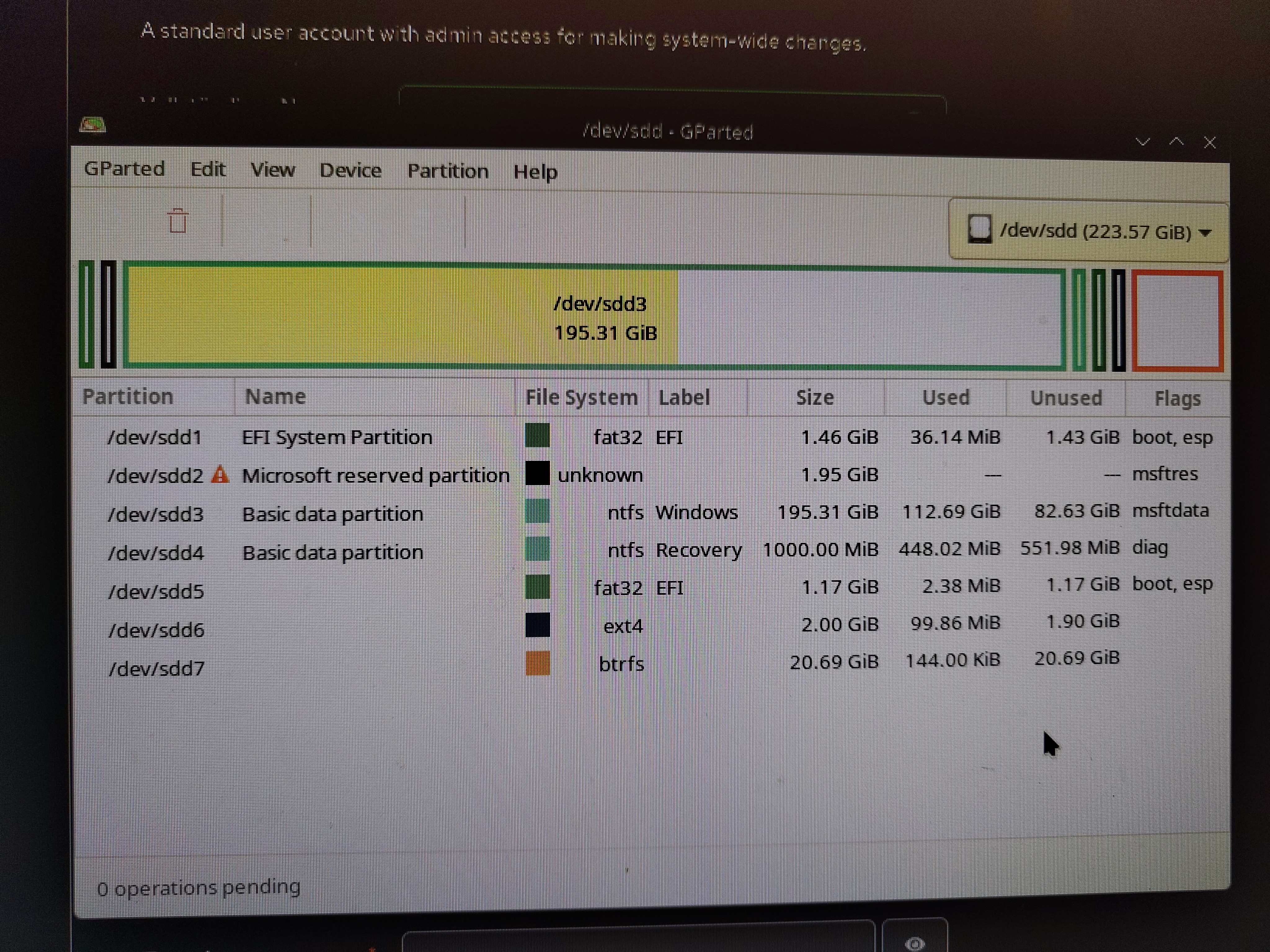
(Mind the flags at the EFI partition) Though then I got the next error later in the process. Result was that the new EFI partition was empty (no files) and no grub2 boot menu either.

Honestly, I will probably wait for when I have more time again, and then backup everything and building up my systems from ground again. This whole mess with the disks comes mainly, because it is my old grown system with too many small disks, filling all SATA ports (so adding a disk is currently not possible. I need to do tabularasa with this to get a cleaner setup. Though that means work, to transfer everythjng to a new system
You must log in or register to comment.
the EFI on the drive is too small. luckily, there can be multiple EFI partitions on the same drive and UEFI scans them all. so create manually the following:
- 1 GB efi, mounted at /boot/efi
- 1 GB ext4, mounted at /boot
- the rest, btrfs or ext4 or what you like, mount at /
normally you’d go with luks2 and encrypt your drive but seeing as how this is for gaming, and it’s only a temporary thing till you nuke windows, skip it this time. good luck!
Today I tried this. The original EFI partition is 1.4 GiB, which should be big enough; I tried nonetheless. The installer has a partioning helper (available through the tree dots menu), though that didn’t show any disks. I had to use gparted to create the partitions. The mentioned error didn’t appear again after I used this partioning:
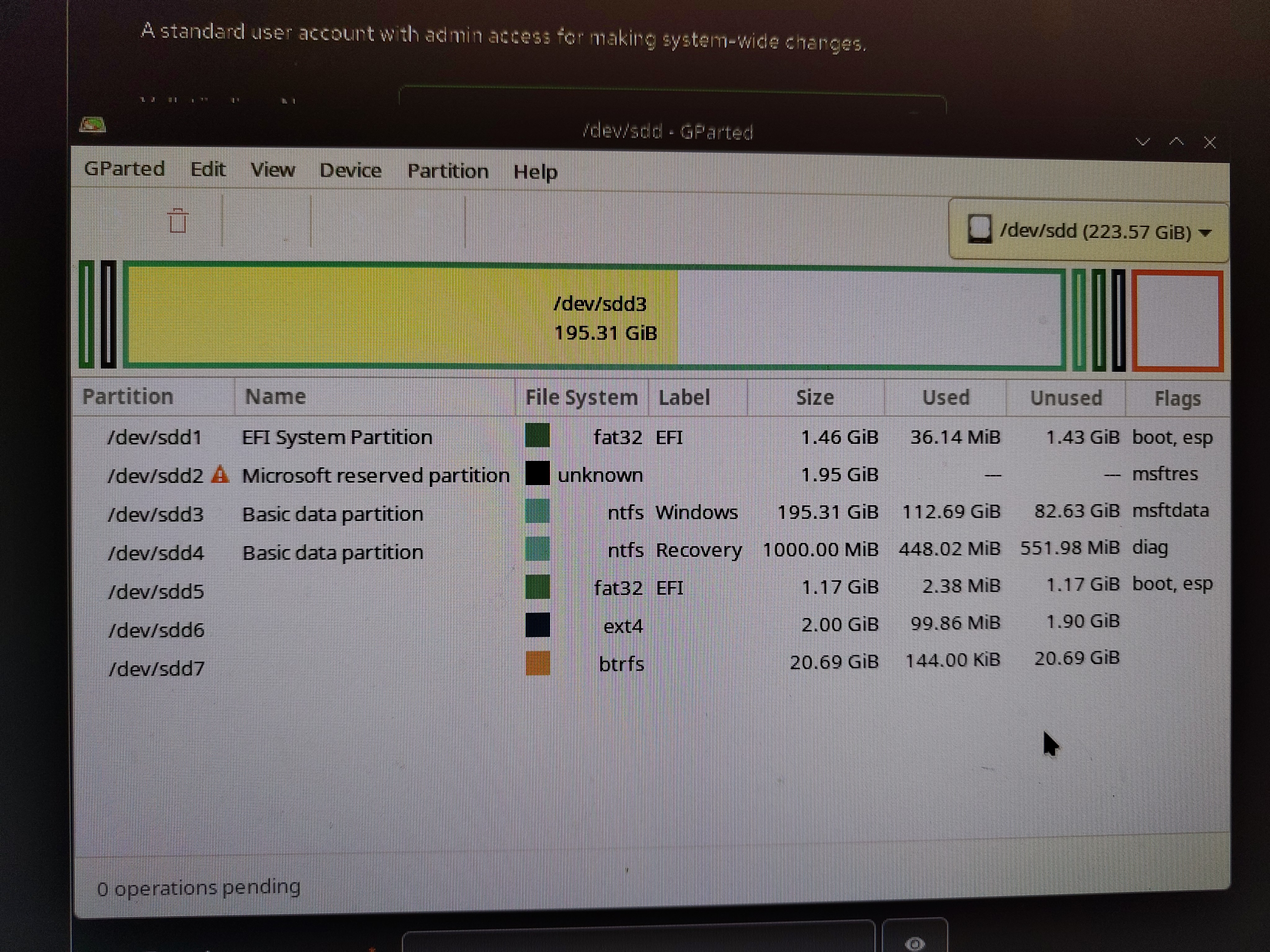
The boot and esp flags where necessary for the installer to accept the EFI partition.
Though I got another error later in the process:

The new EFI partition was completely empty afterwards (checked through my Ubuntu). No grub boot menu entry either.
yeah, the original EFI 1 GB is plenty. but, creating partitions is just part of it, did you designate mount points in the installer? also I don’t think 20 GB is enough for bazzite.
them installers aren’t too good with multiOS setups, as you can tell that “error message” says shit. if you can anyhow manage, get a used 120 GB SSD that should be like $10 or such and use it whole for the OS, you’ll get up and running in no time; disconnect all other drives prior to install so you don’t accidentally fuck something up.
This might sound rather stupid but, have you tried having a separate /boot partition, alongside /boot/efi? I think just having / and /boot/efi is not enough for Fedora and its ilk.
Yes. First I tried having 2 partitions (/boot and /) then I tried to build an additional EFI partition (/boot, /boot/efi and /). Though I could not create the partitions in the installer, since the storage helper (which is reachable through the tree dots menu) didn’t show any storage devices (though gparted and lsblk had no problems seeing them). I then created the partitions using gparted
In fact then the mentioned error didn’t appear. Instead I got a different error at a later stage:

The newly created EFI partition stays empty (I checked by mounting it with my working Ubuntu). And there is no entry in the grub2 boot menu for Bazzite
If I’m understanding correctly, you’re trying to install Bazzite next to an existing Windows on the same SSD? I’ve run into the problem in the past where if Windows was allowed to set up a drive at some point, it makes a really small EFI partition, so sometimes, if you go to install another OS, there may just not be enough space on the EFI partition for all the files needed, so the install will fail.
Check how big your EFI partition is. If it’s like 100MB or something, I’d resize it to like 512MB, then try again. IIRC, parted doesn’t do too well with resizing small FAT32 filesystems, so you may need to do it from Windows, or through some other way.
The original EFI partition is 1.46GiB big. Most of that shows up as unused in gparted. I think, this should be big enough
Not directly related to your problem but Nvidia stopped driver support for 10xx series and 580 is the last supported one. You might wanna check how to stay on a certain driver on Bazzite, after you successfully installed of course. They might put a legacy driver too if they haven’t already.
On the download site they list a section for legacy Nvidia GPUs, including the 10XX series. So I guess that image should already have the correct drivers.
I see. If I don’t remember wrong the legacy version didn’t have 10xx series last time I checked. It seems they took care of it already.
Maybe check your drives for errors.
I had this EFI problem and it turned out to be a couple of file system errors on one of my old windows HDD’s I use for data (not the W11 system drive). I read it somewhere on internet this could be the problem. I think after doing the scannow thing and catching errors on Windows 11, Bazzite installed fine on a clean formatted SSD after.
Bazzite seems to be picky on disk errors, unlike Windows, Windows reported it as totally fine until I checked manually.
Just to make sure I disconnected the data drive, Bazzite installed without any effort (or errors).
Mhh, I will check that as soon, as I have time again
Are you sure you’re using the right ISO? I’ve run into problems when installing and at least once it was because I chose the image for current NVDIA GPUs on a system that needed the old ones. (I guess you did disable Secure Boot and maybe other stuff in BIOS for the install?)
In fact I tried with both Nvidia versions (since I only later had seen the legacy section). Both fail at the same point, before anything GPU related happens.
Secureboot is permanently disabled on this PC. What other stuff should I disable in the UEFI?
Is this the issue? And does the video help?
I’ve actually seen this while researching. Though I don’t have a fedora directory on the EFI partition. And it makes sense, since I didn’t have fedora installed before and the bazzite install could not write to the EFI partition
I ran into this problem with a dual boot of windows 10 and bazzite where I wanted to recoup more drive space for Linux but couldn’t load gparted to allocate more space because windows kept trying to claim that space.
Even though this wasn’t the exact problem I was looking to solve it did work for me.
When you go to install Bazzite can you make a separate EFI partition manually for it? Because that’s the part that I think might help you.
If not, can you back up the windows install and reformat?
I tried a seperate EFI partition (described in other comments above). Got me past this error, though due to another error not to a bootable install. The additional EFI partition stays empty
Ive always had issues with automatic partition when there is a windows boot partition on the drive, maybe do it manually?
Unfortunately that didn’t work either. Is there a special partition configuration, that I need to use here? Do I need to format the EFI partition (as I have chosen not to with the manual partioning)? I don’t want to loose my other OS
You’re trying to enter windows from startup pressing f11 or whatever and not able to get in?
I can enter Ubuntu and Windows just fine via my grub boot menu. I now tried manual partioning in different variants, not leading to a bootable install (see my update in the pist for more info)
What do you use to boot the OS from?
I boot from a USB stick
What version of Bazzite?
The newest nvidia stable version with KDE DE. Should be 43.20260101
When I type in my settings (also a GTX 1060)I get this error. This might be the issue?

It only says, that it doesn’t support steam game mode. I don’t think this should prevent an install. My problem is definitely partioning and EFI related
True. I just didn’t have Any issues, and I have the same gpu. What BIOS do you boot from? I AM booting from asus.