You must log in or register to comment.
This is a much better idea than those products that are $1000 for a bad laptop with a tiny eink screen.
Veronica is fantastic.
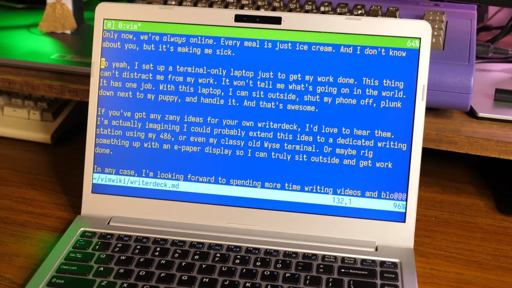
okay, but why the blue background ?
For the eye strain. Gotta build up those muscles.
The short answer is that it’s presumably some vim theme that he likes, but I’d guess that the origin of that is that DOS text-based applications had a long-running convention — not always universally used — of using white text on blue, unlike the Unix convention of white on black.
You can see that persisting in things like default Midnight Commander color choices (it’s set up to look like the MS-DOS Norton Commander):

…or in Network Manager’s console-menu-based utility,
nmtui. I think that thedialogpackage and prior to that, thenewtpackage, both for showing curses-based menu-based interfaces, also defaulted to white-on-blue, probably for the same reason.Hate to be that guy, but presumably she?
Its a woman.
Vibes.
edit.com vibes, at that.
Chef’s kiss URL extraction!
The italic text in Vim threw me for a loop. But I realised it makes sense.
Syntax highlighting already exists in editors. Terminal based ones often implement this in terms of terminal escapes or similar. Most modern terminal emulators support the enable-italic escape. Thus, some combination of these can effectively emulate markdown.
What I do note is that my root Linux consoles (Ctrl+Alt+F[1-6]), and LMDE) don’t support italics, suggesting the Vim instance is running in a full-screen terminal emulator under some windowing system or another.
That seems like overkill just for italics in an otherwise text-only interface, but maybe I’m missing something (patience being one possibility).
The answer is right there in the first paragraph, and in more detail if you read the whole article.
The author uses kmscon, that is a usermode console with proper graphics drivers, hi res rendering, and UTF8 font support. There is no desktop environment used.
I suspect that is where the italics support is coming from. Makes me want to try it out.
I’m surprised vim supports italics. Is there any terminal standard for that, like colors and bold text?